ip
Bibo User Guide
“Beep boop… Beeboo… Bibo?” - Bibo, probably
Installation guide:
Commands
Be sure to follow the format specified in the user guide for the commands to work properly. Arguments in UPPER_CASE are to be replaced with user input.
General Commands
bye: Exits the program.
Example usage: bye
Expected output:
Bye! Hope to see you again soon!
The program will exit shortly after.
help: Lists all available commands.
Example usage: help
Expected output:

Task Management Commands
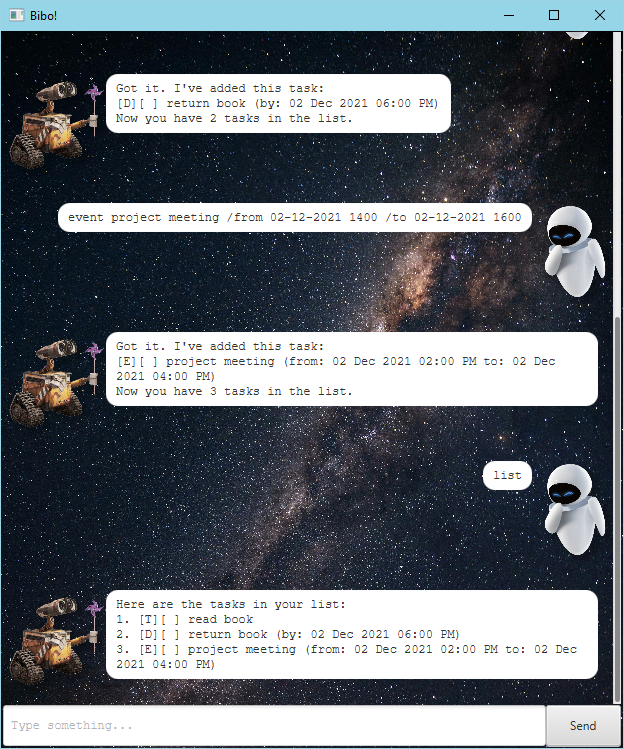
list: Lists all tasks in the task list.
Expected output after running list after adding a todo task with the description “read book”:
Here are the tasks in your list:
1. [T][ ] read book
find KEYWORD: Lists all tasks with the given keyword in the description.
Expected output after running find book:
Here are the matching tasks in your list:
1. [T][ ] read book
Tasks will persist across sessions. The command line interface will display status of loading tasks from a previous session.
Expected output loading tasks from a previous session:
Checking for saved data...
Saved data found. Loading data from file...
Successfully loaded 3 of 3 tasks.
File setup complete.
Task list loaded successfully.
Expected output if data is corrupted:
Checking for saved data...
Saved data found. Loading data from file...
Task format is invalid.
Successfully loaded 1 of 2 tasks.
Some data was corrupted, corrupted data file renamed to:
        data\tasks.txt.corrupted
File setup complete.
Task list loaded successfully.
Task Types
todo DESCRIPTION: Adds a todo task with the given description.deadline DESCRIPTION /by DATE/TIME: Adds a deadline task with the given description and date.event DESCRIPTION /from DATE/TIME /to DATE/TIME: Adds an event task with the given description and date.
All date/time arguments must be in the format dd-MM-yyyy HHmm with time in 24-hour format.
e.g. 02-12-2021 1800 for 6:00 PM on 2 December 2021.
Duplicate tasks are not allowed.
Example commands:
todo read bookdeadline return book /by 02-12-2021 1800event project meeting /from 02-12-2021 1400 /to 02-12-2021 1600
Expected output after running todo read book:
Got it. I've added this task:
[T][ ] read book
Now you have 1 task in the list.
Task Modification Commands
mark TASK_NUMBER: Marks the task with the given task number as done.unmark TASK_NUMBERMarks the task with the given task number as not done.
Expected output after running mark 1:
Nice! I've marked this task as done:
[T][X] read book
deletetask TASK_NUMBERDeletes the task with the given task number.
Expected output after running deletetask 1:
Noted. I've removed this task:
[T][X] read book
Now you have 0 tasks in the list.
Notes Management Commands
notes: Lists all notes in the notes list.
Expected output after running notes after adding a note with the description “read book”:
Here are the notes in your list:
1. read book
note CONTENT: Adds a note with the given content. Use this if you do not need a title for the note.note TITLE /content CONTENT: Adds a note with the given title and content.
Example of expected output after running note read book:
Got it. I've added this note:
read book
Now you have 1 note in the list.
Example of expected output after running note my lunch /content very yummy scrap metal:
Got it. I've added this note:
my lunch
very yummy scrap metal
Now you have 2 notes in the list.
deletenote NOTE_NUMBER: Deletes the note with the given note number.
Example of expected output after running deletenote 1:
Noted. I've removed this note:
read book
Now you have 1 note in the list.
Notes do not persist across sessions. Duplicate notes are allowed.